
Introduction
Email is an incredibly important and convenient method of communication in today’s world. It allows us to send messages and information quickly and efficiently, whether it’s for personal, school, or work-related purposes. In this article, we will simplify the concept of email and how does email work. Our goal is to provide a clear understanding of how messages travel from one inbox to another.
Importance of Email in Communication
Email plays a crucial role in our lives by facilitating effective communication. It enables us to stay connected with friends, family, colleagues, and even people from different parts of the world. Whether it’s sharing updates, collaborating on projects, or exchanging important information, email offers a reliable and accessible platform for communication.
How Email is Sent
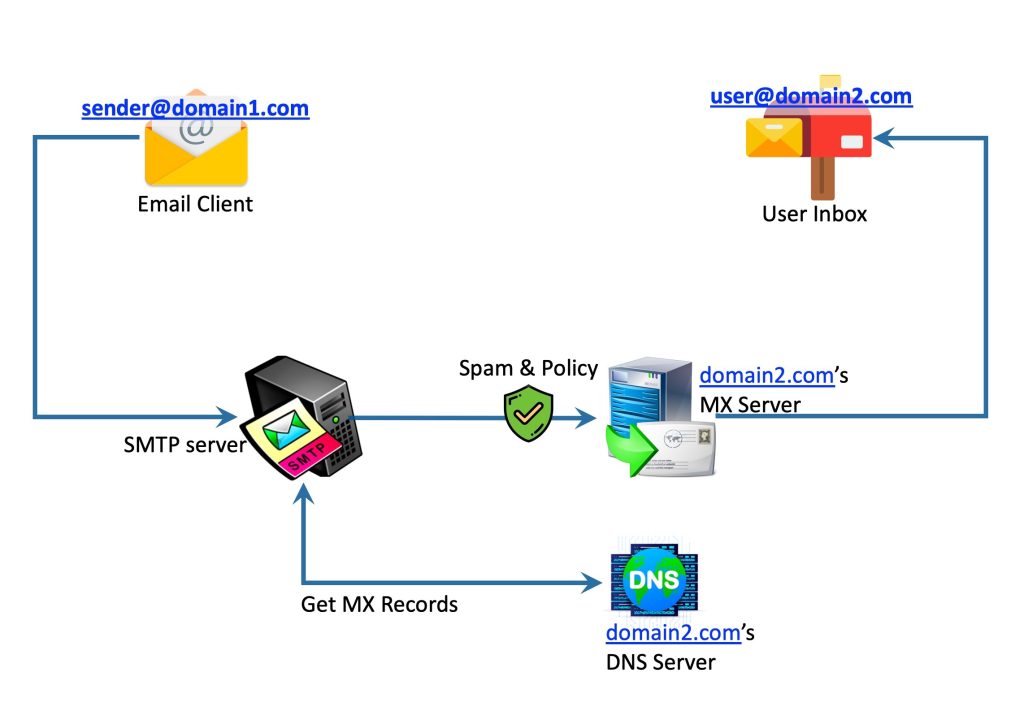
To make the email-sending process easy to understand, let’s imagine it as sending a digital letter. Similar to a physical letter, an email consists of different parts. There’s the sender (that’s you!), the recipient (the person you’re sending the email to), a subject line (to briefly describe the email’s purpose), and the actual message.
When you hit the “Send” button, your email embarks on a journey. It travels from your computer or device to special servers known as email servers. These servers ensure that your email reaches its intended destination by using a protocol called Simple Mail Transfer Protocol (SMTP). Through the internet, which is a vast network of interconnected computers, your email is routed from server to server until it reaches the recipient’s email server. Finally, it is delivered to the recipient’s inbox, ready to be read and responded to.
By understanding how email works, we gain the confidence to make the most of this powerful communication tool. Let’s delve deeper into the fascinating world of email and uncover its inner workings.
Basics of Email
Email, or electronic mail, is a vital way to communicate using computers and the internet. It’s like a digital mailbox that connects us with people worldwide. With email, we can stay in touch with friends, share school stuff, and reach out to distant family members. It’s like a superpower that instantly sends and receives messages, making the world feel smaller and more connected.
Email is a remarkable tool that bridges distances and brings us closer together. Stay connected, communicate, and let email be your gateway to the world.
Definition and Significance of Email
Email is a digital method of sending messages and information using computers and the internet. It can be compared to writing a letter, but instead of using paper and traditional mail, we utilize email to send messages instantly.
The significance of email lies in its ability to keep us connected with friends, family, and people who are far away. It serves various purposes, such as collaborating on school projects, asking questions, or sharing enjoyable content like photos or videos.
Key Components: Sender, Recipient, Subject, Body
When composing an email, it’s important to remember a few key parts. The sender is the person who initiates and sends the email, while the recipient is the person who will receive it. Similar to a letter, knowing the sender and recipient is essential.
The subject is a short and concise title that informs the recipient about the email’s content. A clear subject helps the recipient understand the purpose of the email. The body of the email is where the actual message is written. This is where we can ask questions, share information, or simply say hello.
Understanding these fundamental components of email enables us to use it effectively and communicate with others seamlessly. Let’s dive deeper into the world of email and explore its inner workings.
Email Protocols and Standards
SMTP, POP3, IMAP
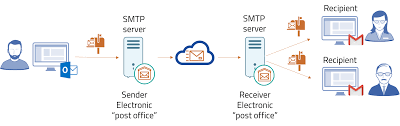
When we send and receive emails, there are special protocols and standards that help make it all work smoothly. One important protocol is SMTP, which stands for Simple Mail Transfer Protocol. It’s like the postal service for emails, making sure they get sent from one computer to another.
Then we have POP3 and IMAP. These are protocols that help us receive emails on our devices. POP3, which stands for Post Office Protocol version 3, downloads the emails to our device and removes them from the email server. On the other hand, IMAP, which stands for Internet Message Access Protocol, lets us access our emails from different devices and keeps them stored on the email server.
MIME: Handling Attachments
Sometimes we want to send more than just a text message in our emails. That’s when MIME comes into play. MIME, or Multipurpose Internet Mail Extensions, helps us attach and send files like pictures, documents, or videos with our emails. It makes it possible for the recipient to see and download these attachments easily.
SPF, DKIM: Security and Authentication
We all want our emails to be safe and secure. That’s where SPF and DKIM come in. SPF, which stands for Sender Policy Framework, helps verify that the email is coming from a legitimate sender and not someone pretending to be them. DKIM, or DomainKeys Identified Mail, adds an extra layer of security by digitally signing the email, ensuring it hasn’t been tampered with.
Understanding these email protocols and standards helps us use email more effectively and keep our messages secure. Let’s explore further and discover more fascinating aspects of email technology.
Challenges and Future of Email

Addressing Spam and Phishing Threats
One of the major challenges that email faces is the presence of spam and phishing threats. Spam refers to unsolicited and unwanted messages that clog up our inboxes with advertisements, scams, and irrelevant content. On the other hand, phishing involves malicious attempts to trick users into revealing sensitive information, such as passwords or credit card details, by posing as a trustworthy entity.
To combat these threats, email service providers have implemented various measures. They use advanced filtering techniques that analyze email content, sender reputation, and user preferences to identify and block spam messages. Additionally, anti-phishing mechanisms have been developed to detect and alert users about potential phishing attempts, helping them avoid falling victim to scams.
Competition from Other Platforms
While email remains a popular communication tool, it faces competition from other platforms like social media networks and instant messaging apps. These platforms offer real-time, interactive, and multimedia-rich communication experiences that cater to specific user preferences.
However, email continues to be widely used due to its versatility and universal accessibility. It allows users to send formal and structured messages, exchange attachments, and maintain a record of correspondence. Additionally, email has established itself as a reliable means of communication for professional purposes, with features like email encryption and digital signatures enhancing security and authenticity.
Mobile Integration and Technological Advancements

The integration of email services with mobile devices has revolutionized how we access and interact with emails. Mobile apps and responsive web designs ensure that emails can be conveniently accessed, read, and replied to on smartphones and tablets. Push notifications provide instant alerts for incoming emails, allowing users to stay updated and respond promptly.
Technological advancements have also improved email interfaces, making them more intuitive and user-friendly. User experience enhancements, such as smart inbox organization, predictive text input, and integrated search functionalities, simplify email management and retrieval of information.
Looking to the future, email is expected to undergo further advancements. This includes the integration of artificial intelligence (AI) technologies to enhance spam detection and filtering, as well as the development of more interactive and collaborative features. Furthermore, efforts to improve email interoperability, streamline authentication processes, and strengthen privacy protections are anticipated.
Despite the challenges and evolving landscape, email remains a vital communication tool. It continues to adapt to meet the needs of users, providing a reliable, formal, and efficient means of communication across personal, academic, and professional spheres.
Conclusion
In conclusion, let’s recap how email works. When we want to send an email, we write our message and include the recipient’s email address. Once we hit the “send” button, our email goes on a digital journey. It starts by leaving our computer and traveling to a special computer called an email server. The email server acts like a post office, sorting and sending our message to the right place.
From there, the email travels to the recipient’s email server, which is like their digital mailbox. Finally, it arrives in the recipient’s inbox, where they can read and respond to our message. This process happens quickly, allowing us to communicate with people all around the world in just a few seconds.